Interesting Verbiage Choices in Technology Journalism
23 October 2014 • by bob • Microsoft, Surface, Apple
I often find technology journalism interesting not because of what is actually said, but because of how it is said. Everyone throughout the technology world has their own opinions and biases, but some people are incapable of separating their personal feelings from the facts when writing about competing technologies.
Here is a perfect example of what I mean - a coworker recently shared the following article with me, and pay special attention to the title:
The iPad Air 2 is the second fastest tablet currently available
http://www.mobileburn.com/23674/news/the-ipad-air-2-is-the-second-fastest-tablet-currently-available
Hmm. "The iPad Air 2 is the second fastest tablet currently available?" If so, then what's the fastest? You certainly wouldn't know by glancing at the article's title.
The article continues in typical Apple-fanboy style by continuously lauding the iPad's accolades as the 2nd-best device throughout the piece, with only a single reference to the clear winner: "... Apple's iPad is the second fastest tablet on the market, only trailing behind Microsoft's Surface Pro 3, a slate that has full PC innards." That statement doesn't actually hold water with the chart that the author includes, which shows that the Surface 3 is far and away the best tablet in terms of overall performance.
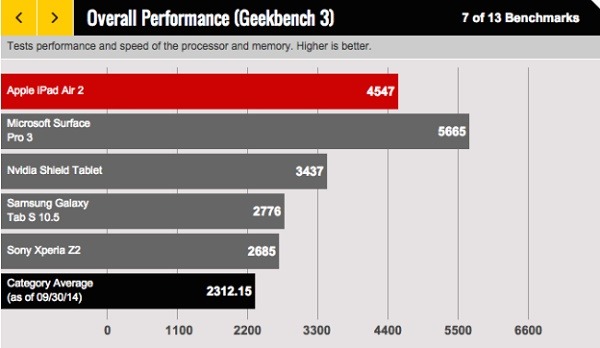
That being said, I seriously question what the article's author meant when he referred to the Surface 3 as "a slate that has full PC innards." Does having PC innards disqualify the Surface 3 for some reason? If the iPad had come out on top of this performance comparison, I am sure that the article's author would have pointed out that the Surface 3's "PC innards" were somehow responsible.
I mentioned to someone yesterday that the article in question reminds me of days long ago when the USSR would announce that "Comrade So-and-so won a Silver Medal in the Olympics," while never mentioning who took home the Gold. This article's author chooses his verbiage in a similar manner, so it's not hard to see where his allegiances are.
Personally, I would title this article "Why the Surface 3 kicks your Apple iPoop to the curb."
;-)
Why I Don't Like Macs
25 July 2014 • by bob • Windows, Microsoft, Apple
I freely admit that I am fiercely loyal where my employer is concerned, but my loyalty pre-dates my employment. I was a big fan of Microsoft long before I went to work for them, which was one of the reasons why I was so thrilled when they offered me a job.
My affection for Microsoft goes back to when they were the "Little Guy" standing up to "Big Bad IBM," and at the time everyone loved Microsoft for that reason. (At that time, Macs were still pretty much toys.) But I became a huge fan of Microsoft when I started working in IT departments in the early to mid-1990s. At the time, the licensing fees for WordPerfect, Lotus 1-2-3, Ashton Tate's dBASE, etc., were astronomical, and our little IT budgets spent more on those licensing fees than we did on hardware, so our PCs were sub-par due to price-gouging. Then Microsoft came along and offered all of Microsoft Office with per-seat licensing that was 50% less than any other single software application, so we suddenly had software for every PC and budget to buy more hardware. This cannot be understated - Microsoft made it possible for us to actually focus on having great computers. To us, Microsoft was the greatest company on the planet.

By way of contrast, let's take a look at what Macs were like. In each place where I worked, we had some Macs, and the experiences were nowhere near similar. First of all, the Macs were hideously over-priced. (And they still are.) When a PC died, the data was nearly-always recoverable, and usually the majority of a PC could be salvaged as well. (It was usually only a single part that failed.) Not so with a Mac - when a Mac died (which was just as often as a PC), the user's data was gone, and we couldn't fix the computer because we couldn't walk into a store and buy over-the-counter parts for a Mac. When a brand-name PC failed, its manufacturer was generally helpful with troubleshooting and repairs, whereas Apple had one answer - send us the Mac and we'll get to it when we can. Seriously. Apple was so unwilling to help their users that we grew tired of even bothering to try. We just boxed up dead Macs and sent them (at our expense) back to Apple and forgot about them until Apple got around to shipping something back to us.
To be perfectly honest, I really tried to like Macs - and I used one for quite a while. I had heard that "Macs are better for [this reason]" or "Macs are better for [that reason]," but in my actual experience most of those claims had little basis in reality (with a few exceptions). Macs simply had a loyal fanbase of apologists who ignored the bad parts of their user experience and evangelized the good parts of their user experience. (Which is pretty much what I do for PCs, right? ;-] ) But after months of using a Mac and wrangling with what I still think is a terrible user interface, coupled with the realization that I could be doing my work considerably faster on a PC, it was my actual use of a Mac that turned me off to Macs in general.

I realize that a lot of time has gone by, and both Apple and their products have gotten better, but years of abuse are not easily forgotten by me. There was a time when Apple could have won me over, but their sub-par products and crappy customer service lost me. (Probably forever.) And make no mistake, for all of the blogosphere regurgitation that Microsoft is a "monopoly," Apple is one of the most-closed and highly-controlled architectures on the planet. What's more, prior to the release of OSX, Macs were a tiny niche, but for the most part they were a social experiment masquerading as a computer company that failed to reach more than 5% of the desktop computer market. In short, Apple was a sinking ship until Steve Jobs returned and Apple saved itself through iPod and iTunes sales. This gave Apple enough capital to abandon their failing computer design and rebuild the Mac as a pretty user interface on top of a UNIX operating system. This was a stroke of genius on someone's part, but you have to admit - when your 15-year-old computer business drives your company to the point of bankruptcy and you have to save your company by selling music players, that's pretty pathetic.
Ultimately, Apple users are a cult, Steve Jobs is their prophet (even though Woz is the real hero), and Apple products have always had half the features at twice the price. And that is why I don't like Macs. ;-]
More Examples of Bad Technical Support
18 July 2014 • by Bob • Microsoft, Support, Windows
A few years ago I wrote my Why I Won't Buy Another HP Computer blog, wherein I detailed several terrible support experiences that I had to endure with Hewlett Packard's technical support people. In order to show that not everyone has terrible technical support people, I recently wrote my Why I Will Buy Another Dell Computer blog, where I described a great experience that I had with Dell's technical support people. That being said, not everyone can be a good as Dell, so in this blog I will illustrate another bad support example - this time it's from Microsoft's Technical Support.
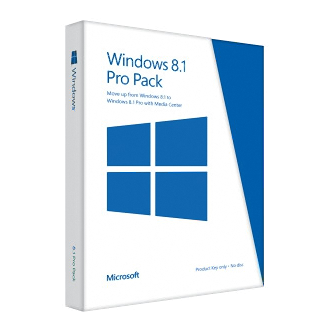
Here's the situation: I recently purchased a Dell 8700 computer, which came with Windows 8.1 installed. Since I run a full Windows domain on my home network, I would rather run the professional version of Windows 8.1 on my computers, so I purchased a Windows 8.1 Pro Pack from Microsoft in order to upgrade my system. The upgrade process is supposed to be painless; Microsoft sends you a little box with a product key that you use to perform the upgrade.
Well, at least that's the way that it should have worked, but I kept getting an error message when I tried to use the key. So after a few attempts I decided that it was time to contact Microsoft's Technical support to resolve the issue. I figured that it was probably some minor problem with the key, and it would be an easy issue to resolve. With that in mind, I browsed to http://support.microsoft.com and started a support chat session, which I have included in its entirety below:
| Answer Desk online chat | ||
|---|---|---|
| Vince P: | 5:12:37 PM | Hi, thanks for visiting Answer Desk. I'm Vince P. Welcome to Answer Desk, how may I help you? |
| You: | 5:13:09 PM | I just purchased a Windows 8.1 Pro Pack Product key from Microsoft for my Dell 8700 computer, but I get an error message that the key does not work. Here is the key: nnnnn-nnnnn-nnnnn-nnnnn-nnnn |
| Vince P: | 5:13:43 PM | I'll be happy to sort this out for you. For documentation purposes, may I please have your phone number? |
| You: | 5:14:02 PM | nnn-nnn-nnnn |
| Vince P: | 5:14:38 PM | Thank you, give me a moment please. As I understand, you cannot install Windows Media Center using the key that you have, is that correct? |
| You: | 5:17:53 PM | Yes, I am trying to upgrade from Windows 8.1 to Windows 8.1 Pro with Media Center |
| Vince P: | 5:18:12 PM | First, allow me to set expectations that Answer Desk is a paid support service. We have a couple of paid premium support options should your issue prove complex and require advanced resources. Before we discuss those further, I need to ask some questions to determine if your problem can be handled by our paid support or if it's something really easy that we can fix at no charge today. I will remotely access your computer to check the root cause of this issue. [Note: Vince sends me a URL and code to initialize a remote session to my computer using a 3rd-party application.] |
| You: | 5:19:40 PM | Why is a remote session necessary? |
| Vince P: | 5:21:19 PM | Yes, I need to check the root cause of this issue. Or I can send you some helpful links if you want. |
| You: | 5:21:52 PM | Or you can ask me to check anything for you What do you need to check? |
| Vince P: | 5:22:38 PM | http://windows.microsoft.com/en-US/windows-8/feature-packs If this link doesn't work, there might be some third party application that are blocking the upgrade. It is much faster if I remotely access your computer, if it's okay with you. |
| You: | 5:24:34 PM | I have gone through the steps in that article, they did not work, which is why I contacted support |
| Vince P: | 5:25:06 PM | I need to remotely access your computer. |
| You: | 5:25:11 PM | The exact error message is "This key won't work. Check it and try again, or try a different key." |
| Vince P: | 5:25:16 PM | Please click on the link and enter the code. |
| You: | 5:25:46 PM | Or - you can tell me what I need to check for you and I will give you the answers you need. |
| Vince P: | 5:26:51 PM | http://answers.microsoft.com/en-us/windows/forum/windows_8-pictures/upgrade-to-windows-8-media-center/6060f338-900f-437f-a981-c2ae36ec0fd8?page=~pagenum~ I'm sorry, but I have not received a response from you in the last few minutes. If you're busy or pre-occupied, we can continue this chat session when you have more time. If I do not hear from you in the next minute, I will disconnect this session. It was a real pleasure working with you today. For now, thank you for contacting Microsoft Answer Desk. Again, my name is Vince and you do have a wonderful day. |
| Your Answer Tech has ended your chat session. Thanks for visiting Answer Desk. | ||
Unbeknownst to "Vince", I worked in Microsoft Technical Support for ten years, so I know the way that the system is supposed to work and how Microsoft's support engineers are supposed to behave. Vince was condescending and extremely uncooperative - he simply wanted to log into my machine, but no one gets to log into my computers except me. I know my way around my computer well enough to answer any questions that Vince might have had, but Vince didn't even try. What's more, when Vince sent me a long support thread to read, he took that as his opportunity to simply end the chat session a few moments later. Very bad behavior, dude.
Unfortunately, Microsoft's chat application crashed after the session had ended, so I wasn't able to provide negative feedback about my support experience, so this blog will have to suffice. If I had a way to contact Vince's boss, I would have no problem pointing out that Vince desperately needs remedial training in basic technical support behavior, and he shouldn't be allowed to work with customers until he's shown that he can talk a customer through a support scenario without a remote session. If he can't do that, then he shouldn't be in technical support.
By the way - just in case someone else runs into this issue - all that I had to do in order to resolve the issue was reboot my computer. Seriously. Despite the error message, apparently Windows had actually accepted the upgrade key, so when I rebooted the computer it upgraded my system to Windows 8.1 Professional. (Go figure.)
Why I Will Buy Another Dell Computer
07 July 2014 • by bob • Hardware, Support, Windows
Several years ago I wrote a blog post that was titled Why I Won't Buy Another HP Computer, in which I described (in detail) a series of awful customer support experiences that I had with Hewlett-Packard (HP) when I purchased an HP desktop computer.
I would now like to offer the details of an entirely different customer support experience that I recently had with what is probably my favorite computer manufacturer: Dell.

Why I Like Dell
To start things off, I need to point out that I am a huge fan of Dell computers, and I have been for years. The reason for my admiration is simply this: Dell's computers have always worked for me. I have never had an experience where the hardware in a Dell computer has failed, even in extremely bad conditions. For example, I used to manage the network for a small church which had somewhere around 15 to 20 desktop computers and three Dell PowerEdge servers. During a particularly bad thunderstorm, a nearby lightning strike took out the hard drives on nearly all of the computers, including the servers. Fortunately everything on the network had multiple redundant backups, but as it turns out - I didn't need to use the backups. Only the hard drives were bad - all of the computers survived the damage, and I was able to use a combination of Symantec Ghost and Runtime Software's GetDataBack to restore all of the data on the failed drives to new drives. Despite the wide swath of destruction, all of the computers were up-and-running in less than a weekend.
In addition to having lived through that situation, I have been nothing but impressed with all of the Dell computers that I have owned both personally and professionally, and I have owned a lot. My currently laptop is from Dell, as is my wife's laptop, my son's laptop, my daughters' laptops, my Windows Media Center computer, my tablet PC, and several of my work-related computers. In fact, the only non-Dell computing devices in my house right now are my home-built rackmounted server, my wife's Microsoft Surface, and the HP computer from my earlier blog - which is what led me to my recent experience.
Shopping for a New PC
The single HP computer in my household is several years old, and it was time for me to start thinking about upgrading. I had been doing a little shopping, but nothing serious. Since I am taking some graduate courses at the University of Arizona, I have found myself on the receiving end of spam that various companies throw at college students. (Dear Spammers: if you are reading this, I do not need another credit card, or back-to-school attire, or a summer internship, or student housing, etc.) But one piece of spam caught my eye: Dell had sent me an email advertising a free tablet computer with the purchase of a new computer. Since I was already in the market for a new computer, I thought that I would check out their deals.
I followed the link from the email to Dell's website, where I quickly learned that Dell's offer was for an Android-based tablet. I could care less about an Android device, but I was curious if Dell had a deal for a Windows-based device. With that in mind, I clicked a link to start a chat session with a sales representative. I don't want to give out full names for privacy reasons, so I'll just say that I wound up with a guy whose initials are "N.A." He informed me that Dell did have a deal where I could get a Windows tablet instead of the Android tablet, although it would cost more. That was perfectly acceptable to me, so I said that I was interested, but I had more questions. Our chat session wound up lasting 45 minutes, all of which was entirely due to me because I spent much of the chat session looking at various products on Dell's website and asking N.A. lots of questions about this option or that.
Bad News and Good News
I eventually decided on a deal that I liked, and I gave all of my contact information to N.A. so he could call me to get my credit card information. N.A. sent me the full text of the chat session, and he promised to call me within five minutes. But he never called. I remembered from the chat session that I had mentioned that I might want to wait 24 hours since it was the day before payday, so after 20 minutes I decided that N.A. might have misunderstood what I had meant, and I decided to wait until the next day to see if Dell would call me back.
By the following afternoon I still hadn't heard anything, so I decided to call Dell's 1-800 number to see what the deal was. I was routed through to a sales representative with the initials W.P., and I explained the situation. He did a little checking, and he informed me of two interesting pieces of information: first of all, the Dell deal for a Windows-based tablet had ended the day before, and much worse - apparently N.A. had quoted me the wrong tablet PC anyway.
Giving credit where it was due, W.P. was great throughout the call - I was understandably disappointed at the situation, and I kind of felt like I was being forced into a "Bait-and-Switch" scenario based on mistakes over which I had no control. W.P. checked with his manager, J.H., who said that he would try to contact N.A.'s department to see if they would stand behind their misquoted pricing. With that, W.P. and I ended the call.
I hadn't heard anything by the following afternoon, so I sent an email to J.H. and W.P. to ask what the status was with my situation, and I forwarded N.A.'s email with the original chat session. I also mentioned that I am a big Dell fan, and this situation was not reflecting well on Dell's ability to make a sale. Shortly after I sent out my email, J.H. called me to say that he couldn't contact the right person in N.A.'s department, so he was taking responsibility for the situation on Dell's behalf and was going to honor the deal. Very cool.
Closing Remarks
This entire experience reinforced my appreciation for Dell - not because I wound up getting a good deal, but primarily because a series of people took responsibility for someone else's mistake and worked to make things right.
Ultimately these people's actions made their company look great, and that's why I will buy another Dell computer.
FYI - The computer and the tablet both arrived and they're great. ;-]
Cleaning Up Your Windows System When QuickTime Has Screwed Up Your Media Settings
11 April 2014 • by Bob • Scripting, Windows
So here's the deal: I don't use anything from Apple. I have no iPod, no iPhone, no Mac, etc. I buy all of my MP3s through Xbox Music and Amazon. :-] Because of this, I have had no real need to install iTunes or QuickTime in years.
But unfortunately it seemed that I had to install either iTunes or QuickTime at one time or other, mainly because some of my digital cameras recorded video in QuickTime *.MOV format. But over the years I learned to detest both iTunes and QuickTime because of the undesirable ways in which they modified my system; both iTunes and QuickTime would remap all of media settings to open in their @#$% player, which I didn't really want in the first place.
Now that Windows supports the *.MOV format natively, and I can easily convert *.MOV files into something infinitely more useful and universal like *.MP4 format, I really never see the need for installing either iTunes or QuickTime.
However, just the other day I installed a new video editor (which shall remain nameless) and it quietly installed QuickTime on my system. I presume that this was to make it easier to import files in *.MOV format into the video editor, but I was pretty upset when I discovered that QuickTime had been installed. What's more, I was angry when I discovered that QuickTime had once again messed up all of my media settings.
In all of this misery is one saving grace: QuickTime has the decency to preserve your original settings. I am assuming that the backups are for when you uninstall QuickTime and attempt to reclaim your system from being hijacked by Apple, but just the same - that little nicety allowed me to fix my system with a little bit of scripting.
So without further introduction - first the script, and then the explanation:
Const HKEY_CLASSES_ROOT = &H80000000
Const strQuickTimeBAK = "QuickTime.bak"

Set objRegistry = GetObject("winmgmts:" & _
  "{impersonationLevel=impersonate}" & _
  "!\\.\root\default:StdRegProv")

objRegistry.EnumKey HKEY_CLASSES_ROOT, "", arrSubKeys

For Each objSubkey in arrSubKeys
  If Len(objSubkey)>2 Then
    If Left(objSubkey,1)="." Then
      objRegistry.EnumValues HKEY_CLASSES_ROOT, _
        objSubkey, arrEntryNames, arrValueTypes
      If IsArray(arrEntryNames) Then
        For i = 0 To UBound(arrEntryNames)
          If StrComp(arrEntryNames(i), strQuickTimeBAK, vbTextCompare)=0 Then
            intReturnValue = objRegistry.GetStringValue( _
              HKEY_CLASSES_ROOT, objSubkey, strQuickTimeBAK, strEntryValue)
            If intReturnValue = 0 Then
              intReturnValue = objRegistry.SetStringValue( _
                HKEY_CLASSES_ROOT, objSubkey, "", strEntryValue)
            End If
          End If
        Next
      End If
    End If
  End If
Next
Here's what this script does: first the script enumerates all of the keys under HKEY_CLASSES_ROOT and looks for file extension mappings, then it looks for mappings which have been modified and backed up by QuickTime. When it locates file extensions which have been modified, it copies the value which was backed up into the default location where it belongs.
All-in-all, it's a pretty straight-forward script, but it sucks that I had to write it.
Using ASX Files with Windows Media Center
16 February 2014 • by Bob • Windows Media Center
Like a lot of Windows geeks and fanboys, I use Windows Media Center on a Windows 7 system as my Digital Video Recorder (DVR) and media library. My system consists of a Dell GX270 computer with a ZOTAC NVIDIA GeForce GT610 video card, and it uses an InfiniTV 6 ETH tuner to receive cable signals. This setup has served us faithfully for years, and it is the center piece of our home entertainment system. If you're not familiar with Windows Media Center, that's because it's a rather hideously under-advertised feature of Windows. Just the same, here is an official Microsoft teaser for it:
But I've done a few extra things with my Windows Media Center that are a little beyond the norm, and one of the biggest items that I spent a considerable amount of time and effort digitizing my entire collection of DVD and Blu-ray discs as MP4 files, and I store them on a Thecus NAS that's on my home network which I use for media libraries on my Windows Media Center. This allows me to have all of my movies available at all times, and I can categorize them into folders which show up under the "Videos" link on the Windows Media Center menu.
That being said, there's a cool trick that I've been using to help customize some of my movies. Some of the movies that I have encoded have some material that I'd like to cut out, (like excessive opening credits and lengthy intermissions), but I don't want to edit and re-encode each MP4 file. Fortunately, Windows Media Center supports Advanced Stream Redirector (ASX) files, which allows me to customize what parts of a video are seen without having to edit the actual video.
Here's a perfect example: I recently purchased the 50th Anniversary Collector's Edition of Lawrence of Arabia on Blu-ray. The film is one of my favorites, and this reissue on Blu-ray is phenomenal. That being said, the movie begins with a little over four minutes of a blank screen while the musical overture plays. In addition, there is an additional eight minutes of a blank screen while the music for intermission is played. This is obviously less than desirable, so I created an ASX file which skips the opening overture and intermission.
By way of explanation, ASX files are XML files which define a playlist for media types, which can be any supported audio or video media. The individual entries can define various metadata about each media file, and thankfully can be used to specify which parts of a media file will be played.
With that in mind, here's what the ASX file that I created for Lawrence of Arabia looks like:
<ASX VERSION="3.0">
  <!-- Define the title for the movie. -->
  <TITLE>Lawrence Of Arabia</TITLE>
  <!-- Specify the movie's author. -->
  <AUTHOR>Columbia Pictures</AUTHOR>
  <!-- List the copyright for the movie. -->
  <COPYRIGHT>1962 Horizon Pictures (GB)</COPYRIGHT>
  <ENTRY>
    <!-- Define the video file for this entry. -->
    <REF HREF="Lawrence Of Arabia.mp4" />
    <!-- Define the start time for this entry. -->
    <STARTTIME VALUE="00:04:17.0"/>
    <!-- Define the duration for this entry. -->
    <DURATION VALUE="02:15:07.0"/>
  </ENTRY>
  <ENTRY>
    <!-- Define the video file for this entry. -->
    <REF HREF="Lawrence Of Arabia.mp4" />
    <!-- Define the start time for this entry. -->
    <STARTTIME VALUE="02:23:38.0"/>
  </ENTRY>
</ASX>
The XML comments explain what each of the lines in the file is configuring, and it should be straight-forward. But I would like to describe a few additional details:
- Individual media entries are obviously defined in a collection of <ENTRY> elements, and in this example I have defined two entries:
- The first entry defines a <STARTTIME> and <DURATION> which skip over the overture and play up to the intermission.
- The second entry defines a <STARTTIME> which starts after the intermission and plays through the end of the movie.
- The other metadata in the file - like the <AUTHOR> and <COPYRIGHT> - is just for me. That information is optional, but I like to include it.
There are several other pieces of metadata which can be configured, and a list of those are defined in the Windows Media Metafile Elements Reference and ASX Elements Reference.
Replacing the Windows 8 Start Menu
13 February 2013 • by Bob • Windows
As most people who have installed Windows 8 have realized by now, this new version of Windows is missing something... something very important: a real Start Menu. In their efforts to make Windows more
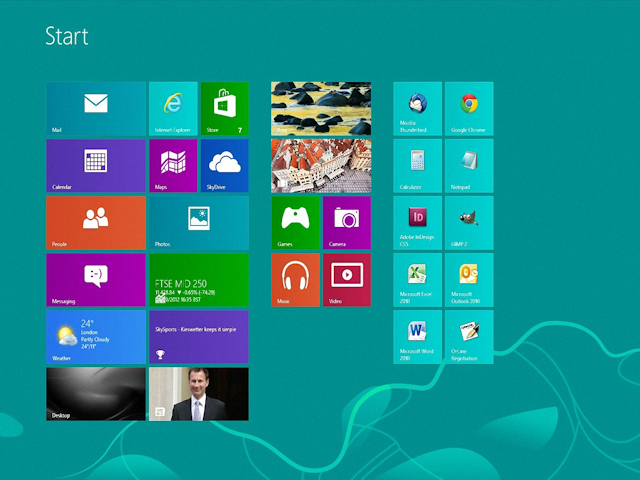
This design was so clunky and so confusing for users that it resulted in the following actual advertisement outside a local computer repair shop:

The Windows 8 user experience was so bad that none of the older members of my family were able to use it, so I set out to find a replacement for the missing start menu; something which would make Windows 8 look and feel like using Windows 7. With that in mind, I tried out several Windows 8 Start Menu applications with mixed results. I did all of my testing on a desktop version of Windows 8, but all of these will work on the Microsoft Surface Pro tablet, although they will not on the original ARM-based Microsoft Surface tablet. (See my notes below about that.)
All that being said, here are some of the better Start Menu replacements that I tested:
Start8:
- URL: http://www.stardock.com/products/start8/
- Pricing: $4.99
- Rating: GREAT
- Feedback: I really liked this start menu; it worked well and it had lots of options - not as many options as some of the menus for which I only gave a GOOD rating, but it was still pretty darn cool. Once you install this start menu system and have it boot into desktop mode, Windows 8 is almost exactly like using Windows 7. (Note that you can buy a license for this application that is bundled together with their ModernMix application which allows you to run Windows Store applications in a window.)
Classic Shell:
- URL: http://www.classicshell.net/
- Pricing: FREE
- Rating: GOOD
- Feedback: This start menu has lots of configurable options so it's very customizable, but its "Windows 7" start menu is basically the same as its Windows XP start menu with a Windows 7 theme, whereas Start8's Windows 7 start menu is the actual menu style that you expect. That said, since it's open-source you could modify it yourself. ;-)
Start Menu X aka Start Button 8:
- URL: http://www.startmenux.com/ or http://www.startbutton8.com/
- Pricing: FREE, although there is a pro version for $19.99
- Rating: GOOD
- Feedback: This start menu has a smattering of options, and it is definitely its own beast in terms of what you get for a start menu. But that being said, it does give you a start menu, just not one that you are used to or expecting.
Classic Start 8:
- URL: http://www.classicstart8.com/
- Pricing: FREE
- Rating: ACCEPTABLE
- Feedback: This start menu has no configurable options, so it cannot be customized. But that being said, its start menu is basically the same as a "Windows 7" start menu. Still, if you need a great freeware approach to getting the start menu back, you can't beat this.
- UPDATE: This start menu also adds some spamware links to the start menu, so I'm not a big fan of this offering.
RetroUI:
- URL: http://retroui.com/
- Pricing: Starts at $4.95 for 1 Consumer Activation and goes up from there
- Rating: TERRIBLE
- Feedback: I did not like this start menu at all - it was cumbersome and confusing and it looked awful. (They were trying to go with a Metro-styled start menu, and it just didn't work).
By the way, I wrote two companies that make Start Menus for Windows 8, and neither will make their product available for Windows 8 RT; they say that the sandboxing features in Windows RT prevent a start menu replacement from working properly. So if you have an original Microsoft Surface RT tablet, not the Microsoft Surface Pro, you're out of luck. :-(
FWIW - here are some URLs that I looked at with discussions about this topic:
The New Look for IIS.NET
05 September 2012 • by Bob • IIS 8, IIS News Item, Windows Server 2012
Following up on today's public release of Microsoft Windows Server 2012 and Internet Information Services 8.0, you'll notice some big changes on the IIS.net website.
Over the past few months, we've been working hard with several partners to roll out a brand-new design for the IIS.net website that resembles more closely the look and feel of our websites for Microsoft Azure, Windows Server 2012, and Visual Studio 2012.
Windows Server 2012 and IIS 8 are now available!
04 September 2012 • by Bob • IIS News Item, Windows Server 2012, IIS 8
Microsoft has just released Windows Server 2012! You can find out more about this release on the Official Windows Server 2012 Launch Website (http://www.windows-server-launch.com).
In tandem with the release of Windows Server 2012, the IIS team is happy to announce the general availability of Internet Information Services 8.0 This new version of IIS offers a wealth of new features and improvements, and here are just a few of the enhancements that you can expect in IIS 8.0: Application Initialization, Dynamic IP Address Restrictions, Centralized SSL Certificate Store, CPU Throttling, FTP Logon Attempt Restrictions, Server Name Indication (SNI) Support, Improved SSL and Configuration Scalability, support for Multicore Scaling on NUMA Hardware, and more! Additional information about IIS 8.0 is available in the "What's New in IIS 8.0 for Windows 8?" web page.
If you'd like to try IIS 8.0 for yourself, you can download the evaluation version and start experimenting today!
Note: This blog was originally posted at http://blogs.msdn.com/robert_mcmurray/
Video: What's New with Internet Information Services (IIS) 8: Performance, Scalability, and Security Features
01 September 2012 • by Bob • FTP, IIS, Windows
The folks in the TechEd group have uploaded the video from my "What's New with Internet Information Services (IIS) 8: Performance, Scalability, and Security Features" presentation to YouTube, so you can view the video online.
You can also download the slides and the WMV/MP4 for my presentation at the following URL:
http://channel9.msdn.com/Events/TechEd/NorthAmerica/2012/WSV332
One quick side note: around 38:55 during the video, I had just asked the audience if anyone had used the IIS Configuration Editor, when a tremendous thunderclap resounded outside - this prompted a great laugh from audience members. After the presentation had ended, a couple people came up and jokingly asked how I had managed to stage that so well.
