Still More Examples of Bad Technical Support
25 June 2015 • by Bob • Microsoft, Support, Windows
Here is another entry in my on-going list of examples for both good and bad technical support experiences. For this situation, I will show an example of bad technical support as provided by the Microsoft Outlook Support Team.
Here is the scenario: about two months ago one of my Hotmail accounts stopped working with Windows Live Mail. When I attempted to sync that particular email account, I received an error message that was similar to the following example:

Bear in mind, however, that I made no changes to my Windows Live Mail settings, and I have several other Hotmail accounts which are working perfectly with the same settings on the same computer.
So I started a support issue with the the Microsoft Outlook Support Team, and over the next several weeks I went back and forth with several people on that team who were clearly uninterested in working on this issue. (In fact, at one point they simply closed the case without notifying me!) As of today the issue is still not resolved, and I have not heard from anyone at Microsoft within the past month.
As I said before, this is an example of really bad technical support.
With that in mind, listed below is the full thread from my support case in order of the events. Note that I have substituted the following variables where necessary to hide my actual account name, email address, and support number:
- %ACCOUNT_NAME% is my Hotmail account name
- %EMAIL_ACCOUNT% is my email address for my Hotmail account
- %TICKET_NUMBER% is my ticket number for my Microsoft support case (e.g. SRX12345678ID)
So without further narrative, here are all of the notes from the support case.
04/18/2015 15:14
Service: General Issue
What type of problem do you have?
- Selected Product
- Outlook
- Selected Issue
- Your account has been temporarily blocked
Enter a short description of your issue: Cannot Sync Email from Windows Live Mail
Enter the email address (Microsoft account) affected by this issue: %EMAIL_ACCOUNT%
Enter your contact email address: %EMAIL_ACCOUNT%
Enter a detailed description of your issue:
I was able to sync my %EMAIL_ACCOUNT% account in Windows Live Mail until a week or so ago, and now I receive the following error message:
Unable to send or receive messages for the Hotmail (%ACCOUNT_NAME%) account.
Server Error: 3219
Server: 'https://mail.services.live.com/DeltaSync_v2.0.0/Sync.aspx'
Windows Live Mail Error ID: 0x8DE00005
For reasons that are completely unrelated to this issue, I completely reinstalled Windows 7 Ultimate on this computer, and yet after reinstalling Windows and Windows Live Mail on this computer I still see the same error. In addition, I have a couple of other Hotmail accounts that I use with Windows Live Mail on the same computer and they work without any errors.
With that in mind, the problem should not be caused by any settings on my computer. However, I did not make any changes to my account settings at Hotmail before I started seeing this problem.
There is one thing that I have noticed, though - when I log into the Hotmail.com website, when I use one of my other Hotmail accounts the title bar says Outlook.com, whereas the title bar for my %EMAIL_ACCOUNT% account says Outlook Mail (Preview).
04/18/2015 15:18
From: Microsoft Support
We are writing to let you know that we have received your request for support and will reply within 24 hours.
If you don't see a message from us within 24 hours, check to see if email from @css.one.microsoft.com is in your junk mail folder. You can check the status of your request on the Microsoft Support site.
https://support.microsoft.com/oas/default.aspx?tp=il&tenant=WOL&sd=winlive&incno=%TICKET_NUMBER%
Thank you,
The Microsoft Support team
04/19/2015 22:51
Subject: %TICKET_NUMBER%
From: Escalation Agent
Hi,
Thank you for contacting Outlook.com support.
My name is Therese and I'm glad you have reached us today. I have read your description and I understand that you are getting an error message when syncing your account at Windows Live Mail. Let me see what I can do for you.
To start off, we appreciate your efforts in isolating the case by uninstalling and reinstalling your Operating System and Windows Live Mail on your computer. You also mentioned that other Microsoft accounts are working fine on Windows Live Mail which tells us that this is not an issue with the mail client but can be an account-related issue.
With that, I would like you to know that I have escalated this case to our Support Specialist for further evaluation. We will get back to you as soon as we have a resolution or if we need more information.
Your patience is highly appreciated.
Regards,
Therese
04/21/2015 11:12
Subject: RE: %TICKET_NUMBER%
From: %ACCOUNT_NAME%
Has there been any progress on this issue?
FWIW - I have included a screen shot of the error message in Windows Live Mail.
Thanks.
--------------------
Attachments:
0x8DE00005.png
04/21/2015 13:17
Subject: %TICKET_NUMBER%
From: Escalation Agent
Hello,
Good to hear from you again. This is John from Outlook.com support.
We appreciate the screenshot that you have provided us. I have checked your service request and found out that your issue is still being handled by our Support specialists and the investigation is still ongoing. Once we got any developments or if there is anything that our Support specialist would need from you, we'll inform you right away.
Thank you for your cooperation and patience on this matter.
Regards,
John
PS: Please do not delete the first email notification from us. If you did not receive another notification in 24 hours, please check the link on the first email notification to see the case progress.
04/25/2015 12:33
Subject: %TICKET_NUMBER% (Reopen)
From: %ACCOUNT_NAME%
It has been a week since I first opened this support case, and from what I could tell - nothing was ever done. So imagine my surprise when I logged in today and I discovered that this support case had been closed without a single notification from Microsoft. This is terrible customer service, and I AM A VERY DISSATISFIED CUSTOMER!!!
At this point I expect three things:
1. I demand that this issue be escalated to someone who can actually work on the issue and resolve it; I no longer want to suffer through working with incompetent 1st-tier support people.
2. I expect to hear from someone within the next 24 hours with an actual update on this issue; I do not want to hear another blasé response which says "the investigation is still ongoing," because it very clearly was not being investigated.
3. I expect to hear from a manager within the next 48 hours as to why this issue was never worked, never resolved, and closed without contacting me.
If I do not hear from anyone within the times that I have put forth, I will escalate this issue through appropriate channels on my own, which will reflect even more poorly on those who have been doing a terrible job thus far.
04/25/2015 16:52
Subject: %TICKET_NUMBER%
From: Escalation Agent
Hi %ACCOUNT_NAME%,
Thank you for your response and for sharing your feelings with us. I'm Froilan, at your service.
We apologize for taking your valuable time in trying to resolve your issue with the error message when syncing your account in Windows Live mail. I fully understand how you feel about the inconvenience this has brought you. Please be informed that I will get back to our Support Specialist to get update about the status of your case. We understand the urgency of this issue; however, we cannot provide you with the time when a reply will be available. Rest assured that this post is being tracked and we will inform you immediately once we get any updates from them.
We appreciate your continued patience in going through this issue.
IMPORTANT REMINDERS:
Please save and keep the first email notification you received after submitting this request. That notification contains the link for this service request. If you did not receive another notification in 24 hours after your reply, you can check the status of this case and view our response by clicking the link on the first notification.
Best regards.
05/01/2015 09:54
Subject: %TICKET_NUMBER%
From: Escalation Agent
Hello %ACCOUNT_NAME%,
How is it going? We received an update coming from our Escalations Engineer and based from what we've observed, it seems the issue is encountered when the server settings for IMAP is not selected.
What you need to do is to make sure that you've selected and followed the Manual Server Settings for IMAP. This should allow the syncing of your accounts.
For more information about this setting, please refer to the IMAP setting that can be found in the link below.
http://windows.microsoft.com/en-US/windows/outlook/send-receive-from-app
Kindly share us the outcome afterwards.
Regards,
Microsoft Support Team
05/03/2015 22:22
Subject: RE: %TICKET_NUMBER%
From: %ACCOUNT_NAME%
This simply does not make sense; I have several other Hotmail accounts which I simply add them to Windows Live Mail and they automatically work. In the Properties dialog for each of my other accounts, the Server Information tab lists "My mail server is an HTTP server" with the following URL:
https://mail.services.live.com/DeltaSync_v2.0.0/sync.aspx
These are the EXACT same settings as the %EMAIL_ACCOUNT% email account. So why would this one account require custom IMAP settings?
Also, this account was working fine until a few weeks ago when I started seeing the errors. I made no changes to my settings, so it would seem that Microsoft has changed something about this specific Hotmail account. As I pointed out before, the web page banner when I am using this account reads "Outlook Mail (Preview)", which leads me to believe that this account was only partially migrated to the new Outlook Mail servers. With that in mind, I would theorize that the problem is due to a failed attempt on Microsoft's behalf when trying migrate my account from the old Hotmail.com servers to the new Outlook.com servers.
05/03/2015 22:23
Subject: %TICKET_NUMBER%
From: %ACCOUNT_NAME%
By the way, while I sincerely appreciate the assistance of the escalation engineer, I still have not heard back from a manager with an answer as to why my support case was closed by the initial support engineer after no work was completed and no attempts were made to contact me.
05/03/2015 23:56
Subject: %TICKET_NUMBER%
From: Escalation Agent
Hi %ACCOUNT_NAME%,
Thank you for providing us additional details. I'm Hyver from Outlook.com Support and I have reviewed the exchange of responses that you had with my colleagues. I'm truly sorry if the issue still persists after a week of communicating with us. I understand the displeasure that you've expressed for the support that you experienced. We're still here to help you on your issue.
I really apologize for the inconvenience that you've faced. I know you're expecting an email from a manager explaining why the support ticket was closed without someone trying to attempt to contact you. I'd like to let you k now that we are actively monitoring cases that are being reviewed by the Escalations Team and we do not close cases with open escalations. So we would like to ask for a copy of the email notification that indicates that the case was closed. I will include this to my reports as this could be an honest mistake or a system glitch,
I totally recognize that you deserve a valid explanation about what happened and we are not letting our customers to be upset at any point of our investigation. We don't like to see our customers upset and inconvenienced and we always strive to create a positive customer experience. With that being said, this should be reviewed again by our Escalations Team and should be taken care with utmost urgency. Please do not lost faith in us as we are doing our best to resolve this issue the soonest possible time.
As we speak, this support request is in our Escalations Team queue and should be treated with immediate attention. We appreciate your cooperation and understanding.
Should you have other questions or clarifications, please do not hesitate to contact us back.
Sincerely,
Hyver
05/05/2015 18:04
Subject: RE: %TICKET_NUMBER%
From: %ACCOUNT_NAME%
Hello Hyver,
There was never an email when the case was closed, which was part of my complaint. If you look at the case notes, you will see that I had to reopen the case on 04/25/2105 when I discovered that the case had been closed when I logged into this support website to check on the status.
05/05/2015 19:47
Subject: %TICKET_NUMBER%
From: Escalation Agent
Hello,
Thank you for letting us know that there was no email with regard to this case that was closed. We will report this to our higher support team and we'll get back to you immediately once we have the latest update from them.
Again, your patience and understanding are much appreciated.
Kindest regards,
Glenda
05/12/2015 22:46
Subject: %TICKET_NUMBER%
From: %ACCOUNT_NAME%
Another week has passed by, and yet I still have not heard anything, which leads me to believe that no one at Microsoft is actually doing nothing with this case. From my perspective, it seems that the "Escalation Agents" with whom I am working are simply stalling for time and hoping that either the problem will go away or I will quit trying and give up.
With that in mind, I will keep everyone up-to-date: the problem is still there - which should be expected since no one at Microsoft appears to be doing anything to fix the problem.
So let me recap the past week or so: I have heard nothing from Microsoft since the last time that I requested an update, my issue is not resolved, and I never heard from a manager at Microsoft with an explanation as to why the front-line engineers closed the case without contacting me or to discuss a plan of action to resolve this issue.
All of this reflects very poorly on the support engineers with whom I am working. As such, I want to work with someone else. Someone who knows what they're doing. Someone who can actually resolve an issue.
05/13/2015 03:37
Subject: %TICKET_NUMBER%
From: Escalation Agent
Note: To check the status of your request, kindly refrain from deleting our email notification. If you haven't received another notification in 24 hours, you can view the agent's response on URL link provided on the notification email.
Hi,
This is Audrey and we apologizer if this case has been going on for so long without any results. Upon checking your concern is still under investigation by our support specialist. We will be making a follow up regarding this and once we have received a word from them it will be immediately relayed to you.
Rest assured that we are exhausting our resources to resolve this matter as soon as possible.
Thank you,
Outlook.com Support Team
05/19/2015 13:36
Subject: %TICKET_NUMBER%
From: Escalation Agent
Hello %ACCOUNT_NAME%,
Sorry for the wait. We received an update coming from our Escalations Team and there's a possibility that your account's server settings were changed. With this, configuring your account to Windows Live Mail using this server "Windows Live Hotmail" will not work.
We are still working on your issue but what you can do is to use IMAP as your server type if you want to sync your emails.
Thank you for consideration and cooperation.
Regards,
Microsoft Support Team
05/29/2015 13:19
Subject: RE: %TICKET_NUMBER%
From: %ACCOUNT_NAME%
I do not wish to use IMAP; I have used that before and it has presented me with a separate series of issues. I will continue to wait for you to fix the problem with the server settings.
To be honest, at this point I have little faith that the Microsoft Outlook Support Team will do anything to resolve this issue. It is abundantly clear to me that the support team is ignoring my support case and simply waiting for me to close it, which I refuse to do since my problem is not resolved.
So once again I reiterate the obvious - this is a perfect example of truly awful technical support, and it demonstrates why many people eventually give up on Hotmail and switch to Gmail.
Nineteen Years at Microsoft
18 December 2014 • by Bob • Microsoft
Microsoft has an interesting unofficial tradition for employees on their anniversary with the company: we are supposed to bring in one pound of M&M's for each year that we have been with Microsoft.
That being said, when I reached my 10-year anniversary with the company, I decided that 10 pounds or more of M&M's were way too many, and a recent trip to the Cayman Islands provided me with a much better alternative: Caribbean Rum Cakes.

For each subsequent anniversary, I would bring in a rum cake for each year since my date of hire, and these proved to be a big hit with my coworkers. So much so that when I changed teams, I had coworkers ask me if they could still drop by and have rum cake on my anniversary.
However, this past year I began working remotely, so I did not order any rum cakes that year. That was kind of sad for me, because I usually looked forward to my annual tradition. With that in mind, I hadn't really paid attention as my anniversary was approaching this year.
Needless to say, I was quite surprised this morning when I entered my office and discovered that my loving spouse had ordered several rum cakes just for me to celebrate the day…

I have a pretty cool spouse. ;-]
Interesting Verbiage Choices in Technology Journalism
23 October 2014 • by bob • Microsoft, Surface, Apple
I often find technology journalism interesting not because of what is actually said, but because of how it is said. Everyone throughout the technology world has their own opinions and biases, but some people are incapable of separating their personal feelings from the facts when writing about competing technologies.
Here is a perfect example of what I mean - a coworker recently shared the following article with me, and pay special attention to the title:
The iPad Air 2 is the second fastest tablet currently available
http://www.mobileburn.com/23674/news/the-ipad-air-2-is-the-second-fastest-tablet-currently-available
Hmm. "The iPad Air 2 is the second fastest tablet currently available?" If so, then what's the fastest? You certainly wouldn't know by glancing at the article's title.
The article continues in typical Apple-fanboy style by continuously lauding the iPad's accolades as the 2nd-best device throughout the piece, with only a single reference to the clear winner: "... Apple's iPad is the second fastest tablet on the market, only trailing behind Microsoft's Surface Pro 3, a slate that has full PC innards." That statement doesn't actually hold water with the chart that the author includes, which shows that the Surface 3 is far and away the best tablet in terms of overall performance.
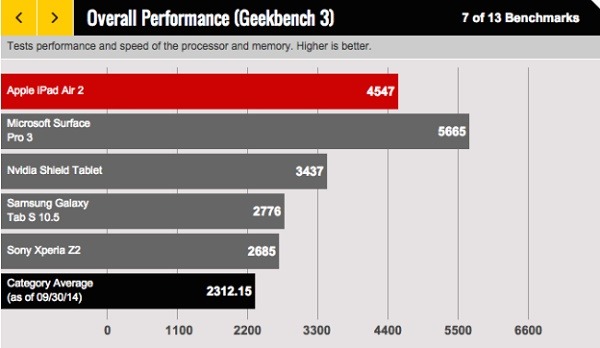
That being said, I seriously question what the article's author meant when he referred to the Surface 3 as "a slate that has full PC innards." Does having PC innards disqualify the Surface 3 for some reason? If the iPad had come out on top of this performance comparison, I am sure that the article's author would have pointed out that the Surface 3's "PC innards" were somehow responsible.
I mentioned to someone yesterday that the article in question reminds me of days long ago when the USSR would announce that "Comrade So-and-so won a Silver Medal in the Olympics," while never mentioning who took home the Gold. This article's author chooses his verbiage in a similar manner, so it's not hard to see where his allegiances are.
Personally, I would title this article "Why the Surface 3 kicks your Apple iPoop to the curb."
;-)
Why I Don't Like Macs
25 July 2014 • by bob • Windows, Microsoft, Apple
I freely admit that I am fiercely loyal where my employer is concerned, but my loyalty pre-dates my employment. I was a big fan of Microsoft long before I went to work for them, which was one of the reasons why I was so thrilled when they offered me a job.
My affection for Microsoft goes back to when they were the "Little Guy" standing up to "Big Bad IBM," and at the time everyone loved Microsoft for that reason. (At that time, Macs were still pretty much toys.) But I became a huge fan of Microsoft when I started working in IT departments in the early to mid-1990s. At the time, the licensing fees for WordPerfect, Lotus 1-2-3, Ashton Tate's dBASE, etc., were astronomical, and our little IT budgets spent more on those licensing fees than we did on hardware, so our PCs were sub-par due to price-gouging. Then Microsoft came along and offered all of Microsoft Office with per-seat licensing that was 50% less than any other single software application, so we suddenly had software for every PC and budget to buy more hardware. This cannot be understated - Microsoft made it possible for us to actually focus on having great computers. To us, Microsoft was the greatest company on the planet.

By way of contrast, let's take a look at what Macs were like. In each place where I worked, we had some Macs, and the experiences were nowhere near similar. First of all, the Macs were hideously over-priced. (And they still are.) When a PC died, the data was nearly-always recoverable, and usually the majority of a PC could be salvaged as well. (It was usually only a single part that failed.) Not so with a Mac - when a Mac died (which was just as often as a PC), the user's data was gone, and we couldn't fix the computer because we couldn't walk into a store and buy over-the-counter parts for a Mac. When a brand-name PC failed, its manufacturer was generally helpful with troubleshooting and repairs, whereas Apple had one answer - send us the Mac and we'll get to it when we can. Seriously. Apple was so unwilling to help their users that we grew tired of even bothering to try. We just boxed up dead Macs and sent them (at our expense) back to Apple and forgot about them until Apple got around to shipping something back to us.
To be perfectly honest, I really tried to like Macs - and I used one for quite a while. I had heard that "Macs are better for [this reason]" or "Macs are better for [that reason]," but in my actual experience most of those claims had little basis in reality (with a few exceptions). Macs simply had a loyal fanbase of apologists who ignored the bad parts of their user experience and evangelized the good parts of their user experience. (Which is pretty much what I do for PCs, right? ;-] ) But after months of using a Mac and wrangling with what I still think is a terrible user interface, coupled with the realization that I could be doing my work considerably faster on a PC, it was my actual use of a Mac that turned me off to Macs in general.

I realize that a lot of time has gone by, and both Apple and their products have gotten better, but years of abuse are not easily forgotten by me. There was a time when Apple could have won me over, but their sub-par products and crappy customer service lost me. (Probably forever.) And make no mistake, for all of the blogosphere regurgitation that Microsoft is a "monopoly," Apple is one of the most-closed and highly-controlled architectures on the planet. What's more, prior to the release of OSX, Macs were a tiny niche, but for the most part they were a social experiment masquerading as a computer company that failed to reach more than 5% of the desktop computer market. In short, Apple was a sinking ship until Steve Jobs returned and Apple saved itself through iPod and iTunes sales. This gave Apple enough capital to abandon their failing computer design and rebuild the Mac as a pretty user interface on top of a UNIX operating system. This was a stroke of genius on someone's part, but you have to admit - when your 15-year-old computer business drives your company to the point of bankruptcy and you have to save your company by selling music players, that's pretty pathetic.
Ultimately, Apple users are a cult, Steve Jobs is their prophet (even though Woz is the real hero), and Apple products have always had half the features at twice the price. And that is why I don't like Macs. ;-]
More Examples of Bad Technical Support
18 July 2014 • by Bob • Microsoft, Support, Windows
A few years ago I wrote my Why I Won't Buy Another HP Computer blog, wherein I detailed several terrible support experiences that I had to endure with Hewlett Packard's technical support people. In order to show that not everyone has terrible technical support people, I recently wrote my Why I Will Buy Another Dell Computer blog, where I described a great experience that I had with Dell's technical support people. That being said, not everyone can be a good as Dell, so in this blog I will illustrate another bad support example - this time it's from Microsoft's Technical Support.
Here's the situation: I recently purchased a Dell 8700 computer, which came with Windows 8.1 installed. Since I run a full Windows domain on my home network, I would rather run the professional version of Windows 8.1 on my computers, so I purchased a Windows 8.1 Pro Pack from Microsoft in order to upgrade my system. The upgrade process is supposed to be painless; Microsoft sends you a little box with a product key that you use to perform the upgrade.
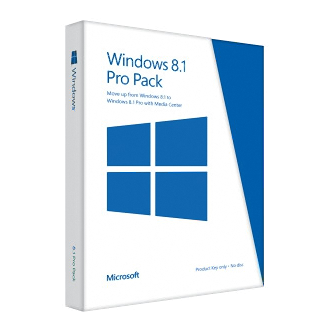
Well, at least that's the way that it should have worked, but I kept getting an error message when I tried to use the key. So after a few attempts I decided that it was time to contact Microsoft's Technical support to resolve the issue. I figured that it was probably some minor problem with the key, and it would be an easy issue to resolve. With that in mind, I browsed to http://support.microsoft.com and started a support chat session, which I have included in its entirety below:
| Answer Desk online chat | ||
|---|---|---|
| Vince P: | 5:12:37 PM | Hi, thanks for visiting Answer Desk. I'm Vince P. Welcome to Answer Desk, how may I help you? |
| You: | 5:13:09 PM | I just purchased a Windows 8.1 Pro Pack Product key from Microsoft for my Dell 8700 computer, but I get an error message that the key does not work. Here is the key: nnnnn-nnnnn-nnnnn-nnnnn-nnnn |
| Vince P: | 5:13:43 PM | I'll be happy to sort this out for you. For documentation purposes, may I please have your phone number? |
| You: | 5:14:02 PM | nnn-nnn-nnnn |
| Vince P: | 5:14:38 PM | Thank you, give me a moment please. As I understand, you cannot install Windows Media Center using the key that you have, is that correct? |
| You: | 5:17:53 PM | Yes, I am trying to upgrade from Windows 8.1 to Windows 8.1 Pro with Media Center |
| Vince P: | 5:18:12 PM | First, allow me to set expectations that Answer Desk is a paid support service. We have a couple of paid premium support options should your issue prove complex and require advanced resources. Before we discuss those further, I need to ask some questions to determine if your problem can be handled by our paid support or if it's something really easy that we can fix at no charge today. I will remotely access your computer to check the root cause of this issue. [Note: Vince sends me a URL and code to initialize a remote session to my computer using a 3rd-party application.] |
| You: | 5:19:40 PM | Why is a remote session necessary? |
| Vince P: | 5:21:19 PM | Yes, I need to check the root cause of this issue. Or I can send you some helpful links if you want. |
| You: | 5:21:52 PM | Or you can ask me to check anything for you What do you need to check? |
| Vince P: | 5:22:38 PM | http://windows.microsoft.com/en-US/windows-8/feature-packs If this link doesn't work, there might be some third party application that are blocking the upgrade. It is much faster if I remotely access your computer, if it's okay with you. |
| You: | 5:24:34 PM | I have gone through the steps in that article, they did not work, which is why I contacted support |
| Vince P: | 5:25:06 PM | I need to remotely access your computer. |
| You: | 5:25:11 PM | The exact error message is "This key won't work. Check it and try again, or try a different key." |
| Vince P: | 5:25:16 PM | Please click on the link and enter the code. |
| You: | 5:25:46 PM | Or - you can tell me what I need to check for you and I will give you the answers you need. |
| Vince P: | 5:26:51 PM | http://answers.microsoft.com/en-us/windows/forum/windows_8-pictures/upgrade-to-windows-8-media-center/6060f338-900f-437f-a981-c2ae36ec0fd8?page=~pagenum~ I'm sorry, but I have not received a response from you in the last few minutes. If you're busy or pre-occupied, we can continue this chat session when you have more time. If I do not hear from you in the next minute, I will disconnect this session. It was a real pleasure working with you today. For now, thank you for contacting Microsoft Answer Desk. Again, my name is Vince and you do have a wonderful day. |
| Your Answer Tech has ended your chat session. Thanks for visiting Answer Desk. | ||
Unbeknownst to "Vince", I worked in Microsoft Technical Support for ten years, so I know the way that the system is supposed to work and how Microsoft's support engineers are supposed to behave. Vince was condescending and extremely uncooperative - he simply wanted to log into my machine, but no one gets to log into my computers except me. I know my way around my computer well enough to answer any questions that Vince might have had, but Vince didn't even try. What's more, when Vince sent me a long support thread to read, he took that as his opportunity to simply end the chat session a few moments later. Very bad behavior, dude.
Unfortunately, Microsoft's chat application crashed after the session had ended, so I wasn't able to provide negative feedback about my support experience, so this blog will have to suffice. If I had a way to contact Vince's boss, I would have no problem pointing out that Vince desperately needs remedial training in basic technical support behavior, and he shouldn't be allowed to work with customers until he's shown that he can talk a customer through a support scenario without a remote session. If he can't do that, then he shouldn't be in technical support.
By the way - just in case someone else runs into this issue - all that I had to do in order to resolve the issue was reboot my computer. Seriously. Despite the error message, apparently Windows had actually accepted the upgrade key, so when I rebooted the computer it upgraded my system to Windows 8.1 Professional. (Go figure.)
My 15 Minutes of Fame
25 September 2002 • by Bob • Microsoft
For some inexplicable reason, Microsoft chose me to be one of their featured employees on the Microsoft Careers website. As a result, I was interviewed and photographed, and my information was posted on the Microsoft website for all to see.
Here is what they posted about me:
.png "robmcm (2)")
Robert
Support Professional
Developer and Line-of-Business Support Internet Team
At Microsoft, we have the opportunity to directly impact the development of a product.
Supporting Microsoft's enterprise-level customers with Microsoft's Internet Information Services Team may seem like a daunting task. Not for Robert, a Support Professional with Microsoft's Developer and Line-of-Business Internet Support Team. He thrives on challenge. "Working on the Internet Support Team is living on the 'Bleeding Edge' of technology," he says. "There are always new issues, new problems to be solved."
It's the excitement generated by Microsoft's products that first attracted Robert to Microsoft. "I worked for a community college in Tucson, AZ," he says, "where I managed a large Windows NT network. We were an all-Microsoft shop, and I was something of a Microsoft software addict. When an opportunity to work at Microsoft came along, I jumped at it."
Starting in Microsoft Access Support, Robert quickly learned that a career at Microsoft would allow him to grow and seek new challenges, while constantly making a difference in the lives of Microsoft's customers-to him, the most rewarding part of his job. "Seeing the way our software helps so many people, and helping them use our software to make their lives easier is great," says Robert.
"Another aspect I enjoy," he adds, "is when an idea of mine becomes part of a new product. I can't think of any other companies where an employee has the ability to contribute to the direction of a project simply by e-mailing a suggestion." Some of the product contributions he's made have even been on behalf of Microsoft's customers. "I'm proud of instances in which I was able to represent our customers' wishes to the Development Team," he adds. "It's always great to be the customers' advocate."
When asked what it's like working at Microsoft, Robert becomes animated. "The way people here work together is amazing," he says, "Microsoft hires people from diverse backgrounds; that allows us to draw on each other's experiences to solve a problem." "And," he contends, "the amount of knowledge that is available internally is staggering - searching our Intranet for information is often more productive than searching the Internet.
The atmosphere of cooperation and camaraderie isn't limited to the workday. While Robert and his co-workers share a passion for technology, a passion for helping Microsoft's customers, and a strong desire to learn, they also share a need to relax, unwind and have fun. "Our team barbecues, goes to lunch together, goes to movies or GameWorks," he says. It's their ability to maintain a balance between work and life that allows them to face the challenges of working in the fluid and fast-paced industry of high technology.
According to Robert, the most technically challenging part of his job is trying to stay abreast of new programming language technologies. "All our programming languages are constantly being redefined to take full advantage of new Windows technologies," he says. And it's the dynamic nature of these languages that often leads to the part of his job that Robert finds most exciting. "Programming," he grins. "There are plenty of opportunities to write code, and I love to write code."