Troubleshooting Tales: OneDrive Image Corruption
30 April 2026 • by Bob • Windows, Troubleshooting, OneDrive
A coworker recently posted a problem that they were seeing: several images that were backed up to OneDrive were getting corrupted, and they were wondering what to do about it. However, I started seeing image corruption exactly like this several years ago, and my situation turned out to be a hard drive that was slowly going bad and corrupting files. The following image illustrates what the corrupted images looked like:
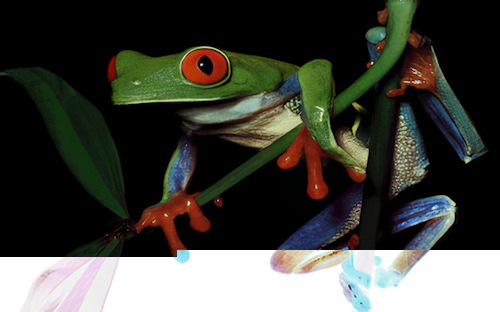
Sadly, however, OneDrive might detect file corruption as file changes, so as files become damaged, OneDrive will dutifully upload the corrupt files to the cloud, thereby overwriting what used to be perfectly good files with damaged files.
With that in mind, my suggestion was to do the following to prevent further corruption:
- Immediately turn off the computer
- Remove the old hard drive from the computer
- Install a new hard drive in the computer
- Reinstall Windows on the new drive
After you've reinstalled Windows, use the following steps to restore your images:
- Plug the old hard drive into the computer using an external USB drive dock (or something like that)
- Run an exhaustive drive check and repair on the old hard drive
- Wait for the check and repair of the old hard drive to complete
- Copy all the files from the old drive to the new drive
That may seem like a lot of steps, but in the end, that's the only thing that halted the continued file corruption.
Tags: Windows, Troubleshooting, OneDrive